
Avervision Document Camera F30
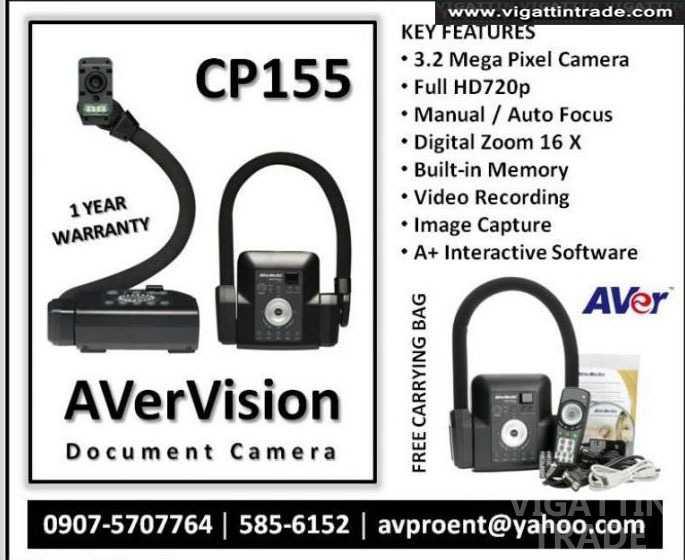
Ad Information
Ad Description
Avervidsion F30 Portale Document Camera
“A well rounded document camera ”
- Best Zoom in Class (16x digital)!
- Flexible (Gooseneck) arm
- Effortless Capture with 1-touch Recording
- AVer Academy Suite
- America's Best Doc Cam Warranty program
With the best service and features in class, the F30 document camera is a jack of all trades and master of value.
20/20. Seeing is learning.

Read the fine print.
Not only does the F30 offer 16X digital zoom but, you can actually move around an image when you are zoomed in – perfect for exploring various parts of a map.

Mega clarity for clearer details.
The F30 is built with 3.2MP so that it always shows crisp text, bright images and vivid colors. Perfect for show and tell. Your students will pay attention because there will be no more "I can't see!"

See micro worlds in action.
With the F30's optional microscope adaptor, you can explore nature's tiniest communities in action. Simply fit the adaptor to any standard microscope eye-piece and you can now display small worlds on big screens.

If only everything was 30fps smooth.
We'll admit it. We suffer a little from attention deficit, so we made sure that the F30 shows only 30fps video. That means it displays only smooth movement and images without any bumps, lags or freezes. Even math demonstrations are more captivating.

Shed some light.
Usually when the projector is on, the lights are off. Since the F30 document camera is connected to a projector, it has built-in LED lights in the camera head to illuminate and display the objects underneath beautifully.
Bells and whistles. It's does a lot.

Make a point.
Connect the F30 to a computer and now you can tap into AVer's exclusive Academy Suite through which you can easily add annotations, highlights, arrows and captions.
It's doubles as a scanner, web camera, video camera, digital camera…
Use the F30 to snap a quick picture and store it on the camera itself, a USB flash drive or a connected computer. You never again need to scan in student work. You can also use the F30 as a video camera by rotating the neck and recording student presentations, class projects or white board images. And if you are a Skype power-user, the F30 as a webcam, shows your face, your students faces, a project, classroom wall… (you get the point).

360° perspective. Feel the Flex.
Do the twist.
Go ahead – lean, bend and flex the F30's gooseneck in any and every direction to get up close and personal from an iPad, Petri dish, your students, your class and more. It won't break.

Move it.
If you have to share your document camera with other teachers, you are in luck. The F30 is the perfect mobile teaching buddy that is light, compact (folds into itself), as well as sets up quickly and easily.

Remote in.
We know teaching doesn’t happen in just the front of the class, so we included a remote. Now you can move around while still controlling the F30. You can even pass the remote to students and allow them to take the F30 for a spin.
AVer Academy Suite. The Integration Specialist

Interactive White Board or Tablet Plug-in.
With the plug-in, AVer's F30 directly integrates into any IWB software to easily add pictures and live video. You can even use the IWB or tablet software to control the F30. That's the power of AVer integration.

MS PowerPoint Plug-in.
Place an AVer doc cam live image directly onto PowerPoint slides. You can even annotate over the entire slide (including the live doc cam image) as well as record the entire presentation.

Sphere Lesson Presentation Software.
With Sphere it's all about the split screen- and share-ability. Feel free to split…the screen that is. Project a live F30 image, a live web cam image, and saved images /videos side by side. Why? Show exam questions next to sample answers. How to videos next to end results. The difference between an iceberg and a glacier is simple when seen. All the while, annotate, highlight and record the presentation and when finished, Sphere will upload to many social media sites – YouTube, Dropbox – to share with colleagues, students and more.
F30 Technical Specifications
| Image | |
| Sensor | 1/2” CMOS |
| Pixel Count | 3.2 megapixels |
| Effective Pixel | 2048 H x 1536 V |
| Frame Rate | 30 fps (max.) |
| White Balance | Auto / Manual |
| Exposure | Auto / Manual |
| Image Mode | Sharp / Graphics / Motion / Microscope |
| Effect | Color / B/W / Negative / Mirror / Rotate / Freeze |
| RGB Output | 1280x720, 1024x768 |
| Composite Output | 720x480 (NTSC) |
| Optics | |
| Focus | Auto / Manual |
| Shooting Area | Max. 16.53” x 11.69” (420mm x 297mm) |
| Zooming | 16X Digital Zoom |
| Function | |
| Image Effect | Color / B&W / Negative / Mirror / Reverse / Freeze |
| White balance/exposure/night view | Auto / Manual |
| Picture-in-picture | Yes |
| Split Screen | Yes |
| Presentation Tools | Spotlight (Yes), Visor (Yes) |
| Capture Mode | Single / Continuous |
| Remote Control | Yes |
| Image Storage | 240 Frames(XGA) ; 80 Frames(3.2M Pixel) |
| Onboard AV Recording | Yes, SD/SDHC/USB |
| Compatibility | |
| Operating Systems | Windows XP SP3 (32-bit), Windows Vista (32/64 bit), Windows 7 (32/64 bit) Mac OS X 10.5.8 or above (Intel based) |
| AVer Software | AVer Academy Suite (Sphere, PowerPoint Plug-in, Flash-Plug-in), A+ 1.7, AVerVision 4 |
| Interactive Whiteboard Compatibility | Yes with AVerVision Flash Plug-in |
| MS PowerPoint | Yes with PowerPoint Plug-in (Windows only, MS PPT 2007 or above) |
| Power | |
| Power Source | DC 12V, 2A, 100-240V, 50-60Hz |
| Consumption | 16.8 Watts (lamp off); 18 Watts (lamp on) |
| Lighting | |
| Lamp Type | LED light |
| Input/Output Connections | |
| RGB Input | 15-Pins D-sub (VGA) |
| RGB Output | 15-Pins D-sub (VGA) |
| CVBS/RS-232 | Mini-DIN Jack (use CVBS/RS-232 Adapter cable) |
| Composite Video | RCA Jack |
| USB | Mini-USB (Connect to PC) Type-A (Connect to USB Flash Drive) |
| SD | SD/SDHC (Up to 32GB) |
| DC 12V Input | Power Jack |
| MIC Input | 3.5mm jack, pink |
| Speaker Output | 3.5mm jack, green |
| Dimension | |
| Operating | 14.96” x 7.87” x 20.67” 380mm x 200mm x 525mm (+/-2mm include rubber foot) |
| Folded | 12” x 9.06” x 3.03” 305mm x 230mm x 77mm (+/-2mm include rubber foot) |
| Weight | 5.51 lbs (2.5kg) |
| External Storage | |
| Secure Digital (SDHC) | 1GB ~ 32GB (FAT32) |
| USB Flash Drive | 2GB ~ 64GB (FAT32) |
| Package Contents | |
| F30 | |
| RS-232/CVBS Cable | |
| USB Cable (Mini type) | |
| RGB Cable | |
| RCA Cable | |
| Power Adapter | |
| Software CD | |
| User Manual CD | |
| Carrying Bag | |
| Remote Control (including batteries) | |
| Anti-glare Sheet | |
| Warranty Card | |
| Quick Guide | |
AVERVISON BRAND WARRANTY
- 1 Year unit, parts and labor (brougrht-in/carry-in service).
now for only
P28,500.00
(CASH ON DELIVERY / COD)
FREE DELIVERY WITHIN METRO MANILA AREAS
FOR MORE INFORMATION PLEASE CONTACT


Compared Ad